California rules that affect your website
Running a business website in California comes with a few legal details that sites in other states can often skip. None of this is legal advice, but these are the points we check on every California site we build.
License numbers in your ads
California generally requires licensed contractors to show their Contractors State License Board (CSLB) license number in advertising, and the board treats websites as advertising. Plumbers, electricians, roofers, HVAC companies and general contractors should show the number on the site, usually in the footer and on the about page. Customers can look it up on the CSLB website, and many do.
A privacy policy
The California Online Privacy Protection Act (CalOPPA) expects sites that collect personal information from California residents, even through a simple contact form, to post a privacy policy. Larger businesses may also fall under the California Consumer Privacy Act (CCPA). We add a plain-language privacy page and link it in the footer.
Accessibility
California sees a large number of website accessibility lawsuits, often under the state's Unruh Civil Rights Act. A site with readable contrast, labeled form fields, alt text on images and full keyboard navigation is better for every visitor and lowers that risk. We build to those basics by default.
How searches differ across the state
California is big enough that a statewide approach rarely works for a local business. Search habits change by region:
- Southern California. Searches often name the neighborhood or the city inside the metro, like Pasadena, Irvine or Chula Vista, rather than the region.
- The Bay Area. People search by city, such as Oakland, San Jose or Palo Alto, and prices for services run high, so customers compare carefully before calling.
- The Central Valley. Fresno, Bakersfield and Modesto have less competition online, so a well-planned site can rank with fewer pages.
- The Central Coast and the North. Smaller towns, longer drives and seasonal tourism in places like Monterey or Santa Rosa mean your service area matters as much as your services.
What usually changes the price for California businesses
Most of our California sites end up near the middle of our range rather than at the $299 base. Big metros support more service and neighborhood pages, and businesses that serve Spanish-speaking customers sometimes add translated pages. Licensing details and a privacy page are included and don't change the price.
Where in California people search for web design
To see how demand spreads across the state, we pulled Google's monthly search volume for "web design" plus the name of each major city or region. These are searches from business owners looking for someone to build their site, so they're a fair proxy for where California's small business market is most active online.
Sacramento and San Diego lead, slightly ahead of Los Angeles, even though LA is far bigger. That's typical: in the largest metros people split their searches across dozens of neighborhood and suburb names. Fresno and Bakersfield punch above their weight for their size, which matches what we see in other trades. The Central Valley has real demand and fewer well-built local sites competing for it.
The same pattern holds for your customers. Whatever you sell, a Californian is more likely to search with a specific city than with "California". So a statewide site should still be built around the cities you serve.
Website design companies in California: how to compare them
Searching for "website design companies California" gives you directories, review platforms and agency rankings, and every one of them lists different winners. Rather than trusting a ranking, compare companies on a few practical points:
| Question to ask | Why it matters in California |
|---|---|
| Will you show my license number and add a privacy page? | CSLB and CalOPPA expectations apply to many California businesses |
| How do you decide which pages I need? | Your customers search by city, so the page plan should reflect your service area |
| What does the site cost after launch? | Some agencies charge monthly retainers that add up to more than the build |
| Who owns the domain and the content? | You should, so you can leave without rebuilding |
| Is the site built to basic accessibility standards? | California has one of the highest rates of website accessibility claims in the country |
| Can you add Spanish pages? | Many California customers search in Spanish, especially in Southern California and the Central Valley |
A California website design company that can't answer these clearly is guessing.
A real growth curve from one of our sites
This chart shows monthly Google impressions, the number of times the site showed up in search, for a home service client we work with. The data comes straight from Google Search Console. We hid the client's name, and the numbers themselves are unchanged.
The site started showing up in February 2026 and grew to over 2,500 impressions a month by mid-year as Google picked up its service and area pages. That client is in Georgia, not California. We share it because it's real data from a site built the way we'd build yours, and we don't make up numbers for markets we haven't worked in.
One of our sites, annotated
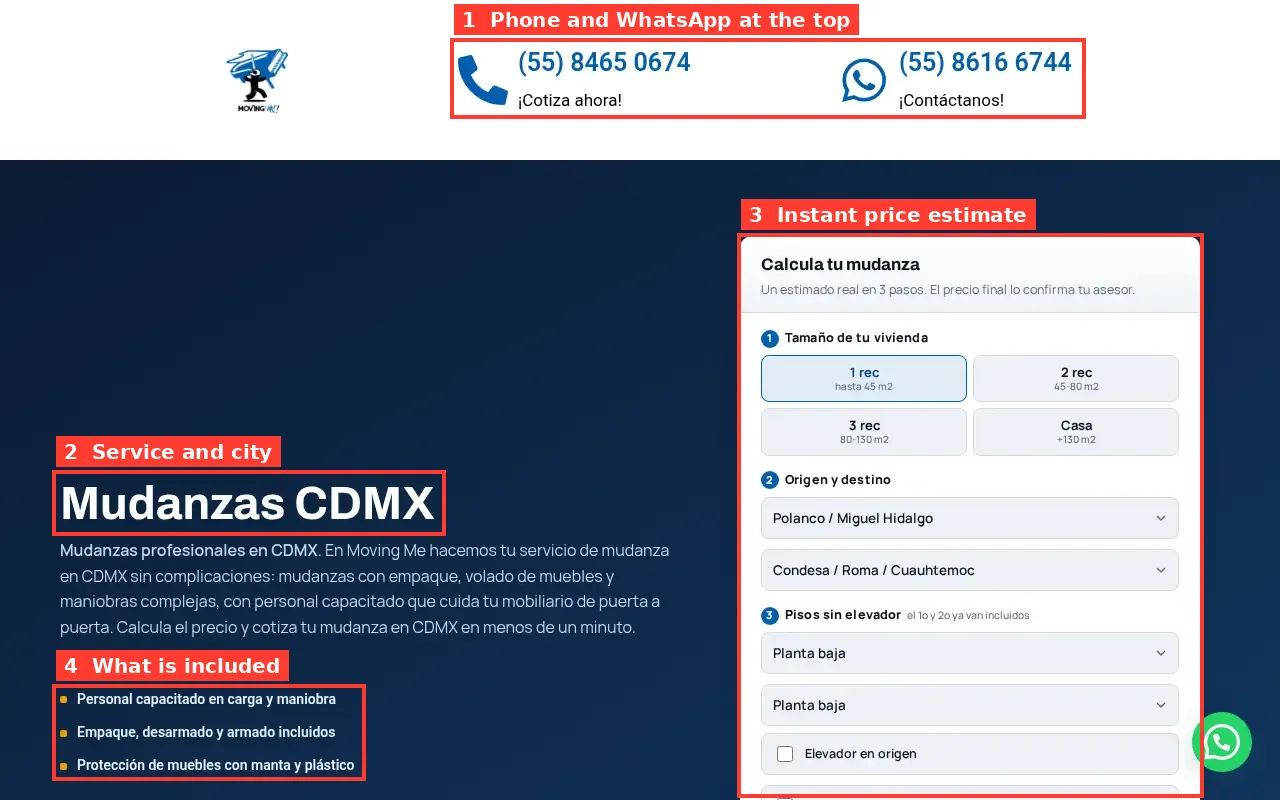
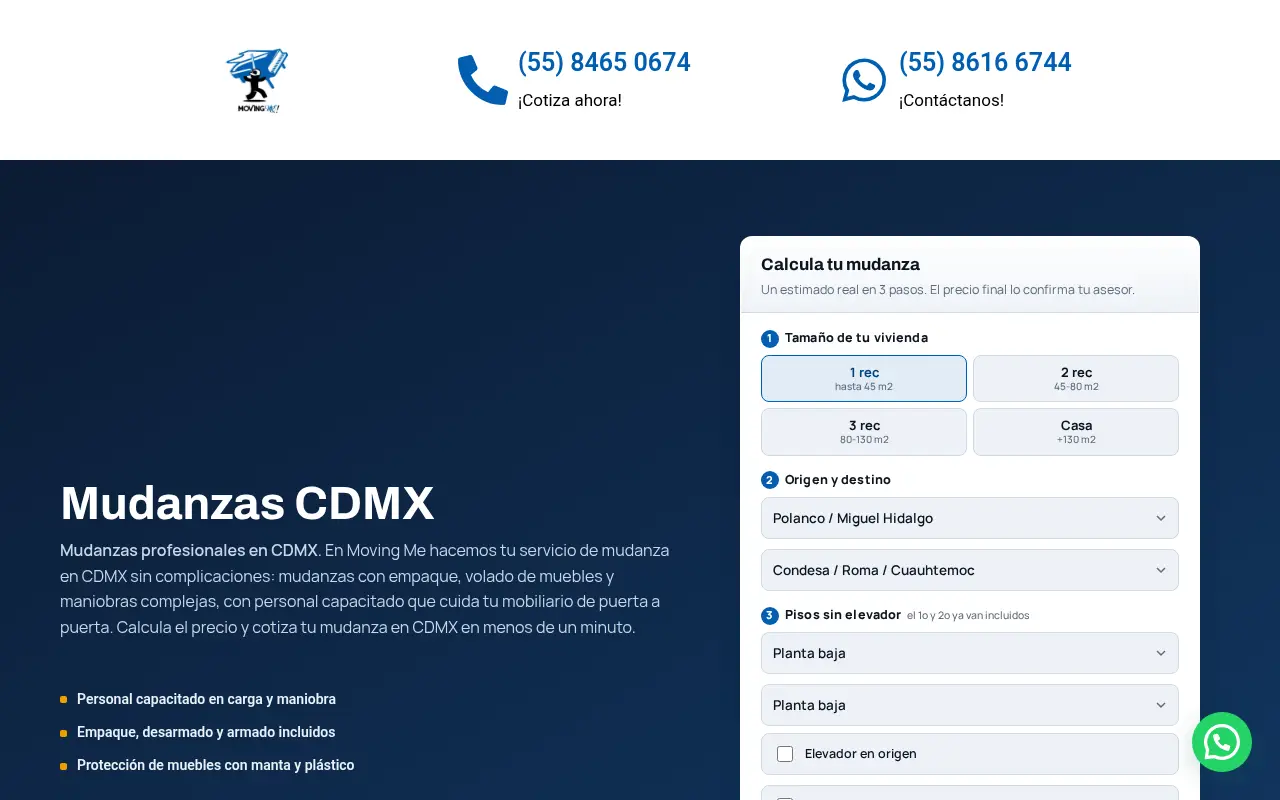
This moving company site shows the pattern we use for California service businesses too: phone and messaging at the very top, the service and the city in the headline, and a way to get a price without waiting for a callback.
The map results decide most local calls
For most service searches in a California city, Google puts a map with three businesses above everything else. Here is a real example for an electrician search in San Diego.
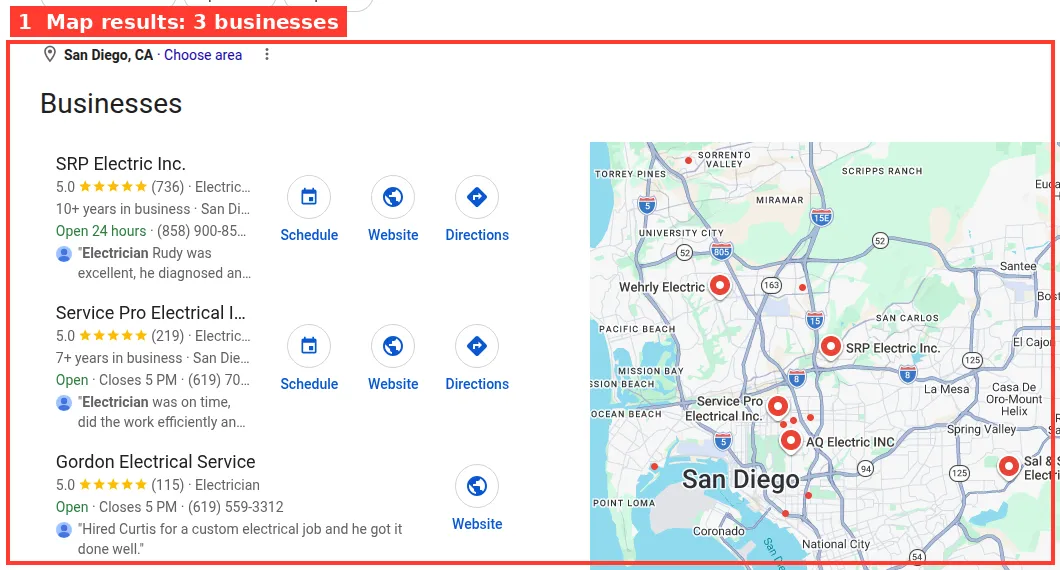
Those three spots depend mostly on your Google Business Profile, your reviews and how close you are to the person searching. Your website helps by confirming your services, your address and your service area. When the site and the profile say the same thing, Google trusts both more.
Regions of California and what each site needs
Southern California
Los Angeles, Orange County, San Diego and the Inland Empire are each big markets on their own. A business here usually needs a page for each city it serves and often a Spanish version of key pages. Competition on the map results is intense, so reviews and good photos matter a lot. If you're based in the city of Los Angeles, our page on web design in Los Angeles, CA goes into neighborhoods and local details.
The Bay Area
San Francisco, Oakland, San Jose and the Peninsula have high-income customers who research before they call. Sites here benefit from clear pricing pages, detailed service descriptions and proof of quality like before-and-after photos and named reviews.
Sacramento and the Central Valley
Sacramento has the highest search volume for web design of any city in our data. Combined with Fresno, Bakersfield, Stockton and Modesto, the Valley has lots of service businesses and relatively few strong local websites. A tidy site with city pages can climb faster here than in the coastal metros.
The Central Coast and Northern California
Santa Barbara, San Luis Obispo, Monterey, Santa Rosa and Redding are smaller markets with long distances between towns. Clear service area maps, travel fees and seasonal hours matter more than an extra service page.
Spanish-language pages for California customers
About a quarter of Californians speak Spanish at home, according to the Census Bureau's American Community Survey, and in parts of Los Angeles County, the Inland Empire and the Central Valley the share is much higher. Many of those customers search in English but prefer to call a business where they can explain the problem in Spanish.
For those businesses, we write Spanish versions of the main service pages rather than running the site through a translation widget. The Spanish pages get their own titles and descriptions so they can show up for Spanish searches, and the phone number on them leads to someone who can answer in Spanish. If no one on your team speaks Spanish, we leave it out. Promising it and then not delivering costs more trust than it earns.
What we build for a California business
- Run the calculator with your trade and your main city. It shows local search demand and the pages it suggests.
- List your service area. We check demand for each city you cover and pick the ones worth their own page.
- Gather the California details. License number, any bonding or insurance info, and whether you need Spanish pages.
- We write and design the site, with your phone number always reachable on mobile and real photos from your jobs.
- We add the privacy page and accessibility basics so the site meets the expectations described above.
- You review, we adjust and we launch, and we connect your Google Business Profile.
A California website checklist
- CSLB or other state license number in the footer, if your trade needs one
- A privacy policy linked from every page
- Readable contrast, labeled form fields and alt text on images
- A page for each city you serve, written for that city
- Consistent business name, address and phone across the site, Google and Yelp
- Spanish pages if a large share of your customers prefer Spanish
- Fast loading on mobile data, since many of your visitors will be on the road
Common mistakes on California small business sites
- Targeting "California" as a whole. Almost no customer searches that way for a local service.
- Leaving the license number off. It's a trust signal for customers and expected by the CSLB for contractors.
- No privacy policy on a site with a contact form. It's easy to fix and expected under CalOPPA.
- Copying one city page across twenty cities. Each city page needs its own details to be worth indexing.
- Ignoring Spanish-speaking customers. In many California markets that's a big part of the audience.
How much a website costs in California
Our price doesn't change by state: $299 for the base site and $15 for each extra page, capped at $630. California agencies often quote from a few thousand dollars and up, and many charge monthly. For a detailed breakdown of what drives website prices anywhere, see our guide on how much a website costs. Trades like plumbing have their own needs, covered in web design for plumbers. To see your own number, use the website cost calculator.