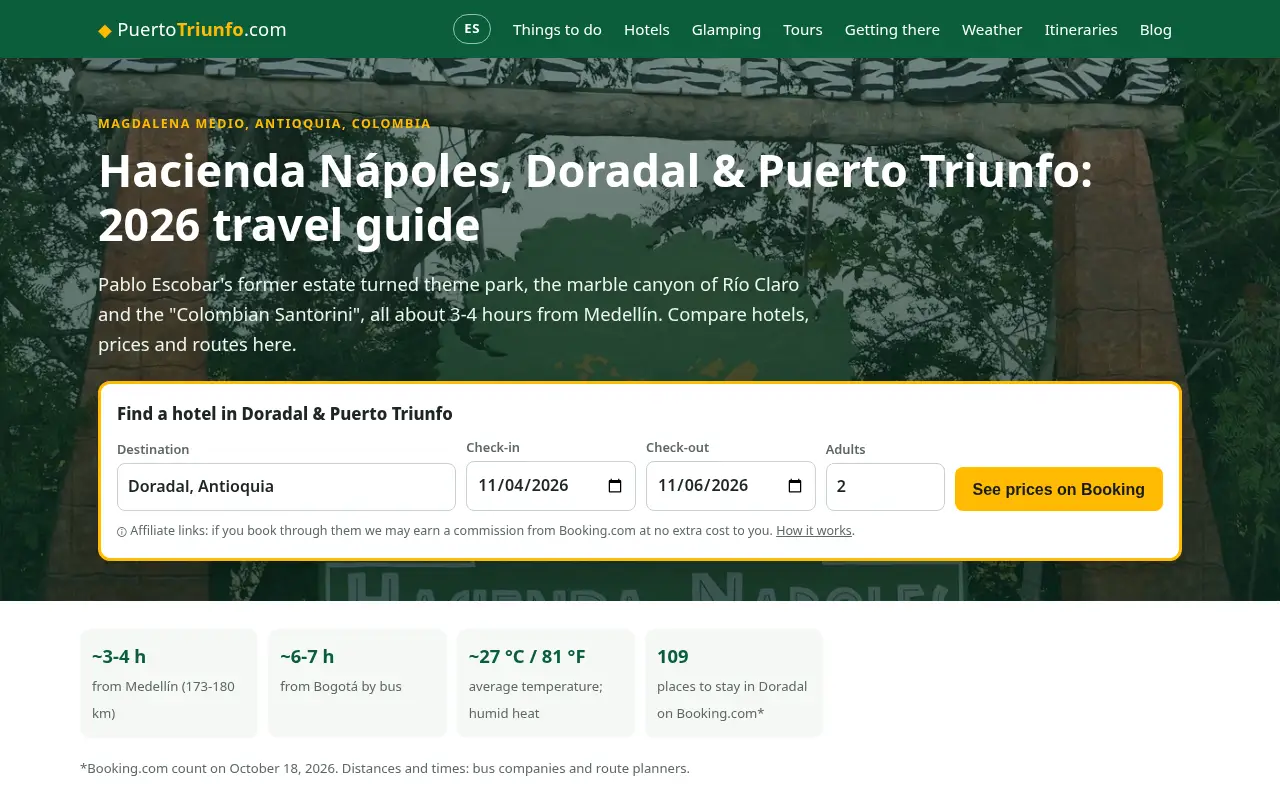
What a plumber website has to do
A plumber website has one main job: make the phone ring. Most people who land on it have water where it shouldn't be, a water heater that quit or a drain that won't clear. They are on a phone, often standing in a wet kitchen, and they will call the first plumber who looks local, available and trustworthy. Everything on the site should help them make that call in a few seconds.
The second job is to show up on Google in the first place. A good-looking site that nobody finds is a business card in a drawer. So a plumber website is half design and half local SEO. You need pages that match what people type into Google in your area, and you need those pages to load fast and look credible once someone taps through.
The third job is to filter. A site that explains your service area, your hours and roughly what things cost saves you from calls you can't take, like a job two counties over or a customer looking for the cheapest possible quote on a full repipe.
If you keep those three jobs in mind, most design decisions get easy. A slider of stock photos doesn't help anyone call, rank or decide. A sticky call button, a page about water heater repair in your town and a few real reviews do.
Plumber website design at a glance
| Part of the site | What it does | What to put there |
|---|---|---|
| Header | Gets the call | Phone number, tap-to-call button, "24/7" if true, service area |
| Home page | Sends people to the right page | Main services, towns, reviews, license number |
| Service pages | Rank for each job | One page per service: drains, water heaters, leaks, sewer, repipes |
| Area pages | Rank in each town | One page per town or neighborhood you really serve |
| Reviews | Build trust fast | Google reviews with names and dates |
| About page | Shows real people | Owner, techs, truck photos, license and insurance |
| Contact page | Catches non-urgent jobs | Short form, map, hours |
The header: your phone number is the hero
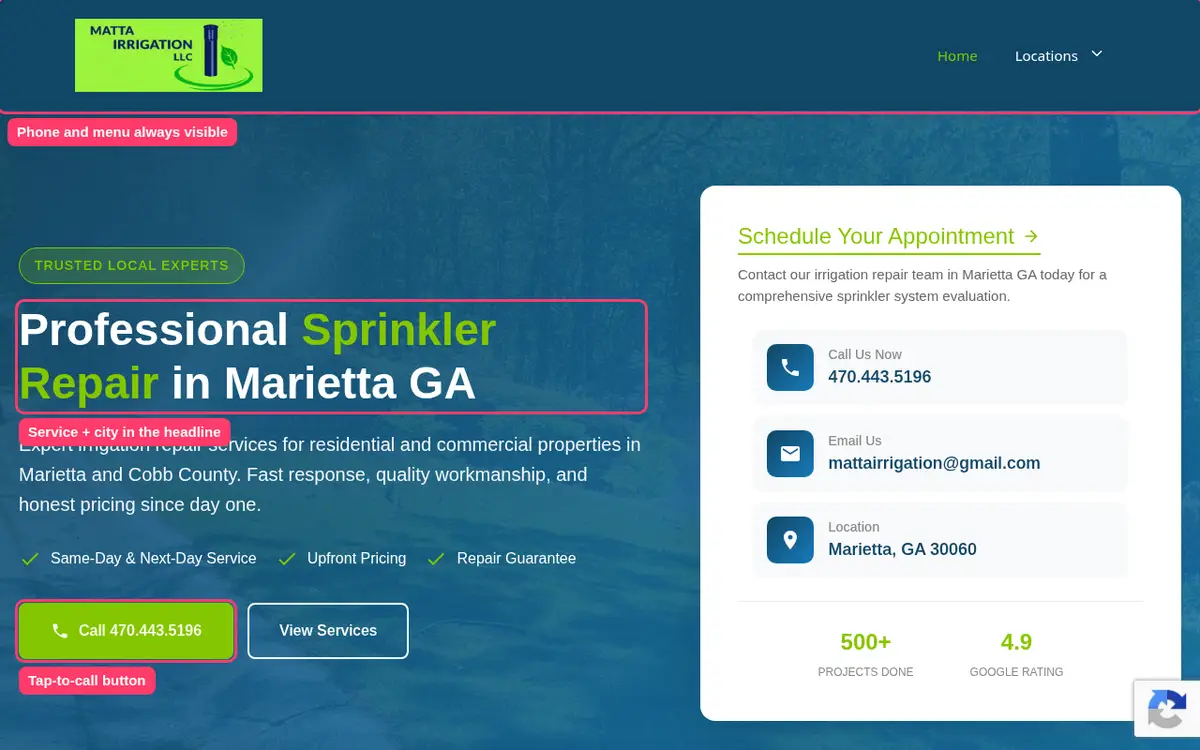
On a phone, the top of the screen is the only thing many visitors see before deciding. Put your phone number there as a big tap-to-call button, and keep it visible as people scroll. Under it, add a short line that answers the next question in their head: "Same-day service in Cobb County" or "Emergency plumbing, 24 hours" if you really offer it.
Avoid hiding the number behind a menu icon or a "Contact us" link. Avoid a form as the first thing on the page. Someone with a burst pipe is not going to type a paragraph into a box and wait for an email.
On desktop, the number goes top right, where people look for it, with your hours and service area next to it. A second button for "Book online" or "Get a quote" is fine, as long as the call button is the one that stands out.
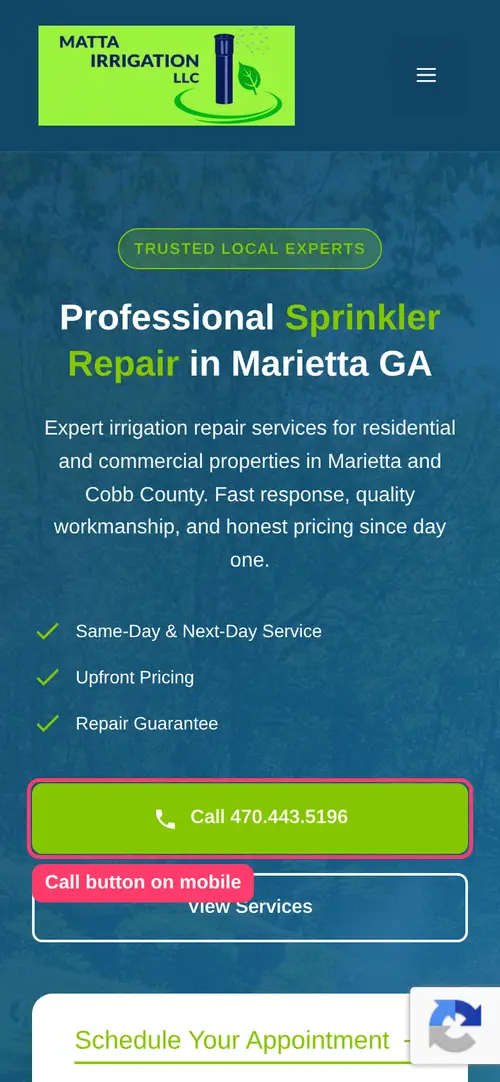
Service pages: one page for each job you want
This is where most plumber websites lose rankings. They have one "Services" page with a bullet list: drain cleaning, water heaters, leak repair, sewer lines, gas lines, remodels. That page tries to rank for everything and ends up ranking for nothing.
Google matches searches to pages. When someone searches "water heater repair Marietta", Google wants a page that is about water heater repair, mentions Marietta and answers the questions people have about that job. A line in a bullet list doesn't qualify.
So each service you want more of gets its own page. A typical plumbing company ends up with something like this:
- Drain cleaning and clogged drains
- Water heater repair and replacement, including tankless
- Leak detection and slab leaks
- Sewer line repair, replacement and camera inspection
- Repiping
- Toilet, faucet and fixture repair
- Garbage disposal repair and installation
- Gas line repair, if you are licensed for it
- Sump pumps, backflow testing or well pumps, depending on your area
- Emergency plumbing
What goes on a service page
Each service page should read like you explaining the job to a homeowner on their porch. Cover what the problem looks like, the usual causes, what you do about it, how long it takes and what affects the price. Add a few photos from real jobs and a couple of reviews that mention that service.
Finish every service page with the same thing the header offers: a clear way to call or book. Link to related services too. A water heater page can link to tankless installation and to leak detection, because those are the questions people ask next.
How many service pages do you need?
Only as many as there are searches for. In a big metro, people search for "slab leak repair", "tankless water heater installation" and "hydro jetting" often enough to support a page each. In a small town, "plumber" plus the town name might be most of the search volume, and three or four service pages cover it.
Our web design cost calculator checks this for your city. It looks at real Google searches for your trade, groups them and suggests one page per group that has enough searches to be worth targeting. That way you don't pay for pages nobody will find.
Emergency and 24/7 plumbing pages
Emergency searches are the most valuable traffic a plumber can get. People searching "emergency plumber near me" or "24 hour plumber" are ready to call right now and are less sensitive to price.
If you really answer the phone at night and on weekends, give emergency service its own page and say it plainly on every page. Tell people what counts as an emergency, what to do while they wait (shut off the main water valve, turn off the water heater), how fast you usually arrive and whether after-hours visits cost more.
If you don't offer 24/7 service, don't claim it. Visitors who call at 2 a.m. and get voicemail leave bad reviews, and Google can see that your Business Profile hours don't match. Instead, list your real hours and say how quickly you return messages.
Service area pages for each town you cover
Most plumbers serve more than one town, and in a big metro the list grows fast. Our page on web design in Los Angeles, CA shows how we plan neighborhood pages, and website design in California covers how searches split by region. A company based in Marietta might work in Kennesaw, Smyrna, Roswell and half of Atlanta. If the site only mentions Marietta, it is invisible to people searching in the other towns.
Area pages fix that. Each one is about your plumbing services in one town or neighborhood. The good ones are written for that place: the neighborhoods you work in, the kind of homes there (older homes with galvanized pipes, new builds with PEX), local water issues like hard water, and how fast you can get there.
What doesn't work is copying the same page twenty times and swapping the town name. Google tends to ignore pages that are the same text with one word changed, and visitors can tell. Fewer area pages with real local detail beat many thin ones.
Local SEO and your Google Business Profile
For plumbers, the map results often matter more than the regular results below them. When someone searches "plumber near me", Google usually shows three businesses on a map first. Those three get a large share of the calls.
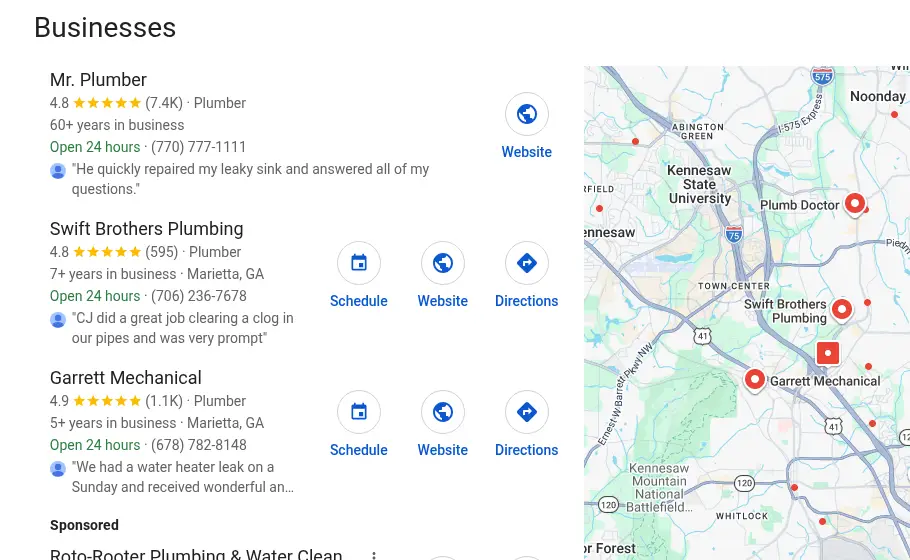
Your Google Business Profile is what puts you in that map. Your website supports it. A few things make the two work together:
- Use the same business name, address and phone number on the site and on the profile, written the same way.
- Choose "Plumber" as the main category and add secondary ones that fit, like "Water heater repair service".
- Link the profile to the most relevant page, usually your home page or the area page for your town.
- List the same hours on both.
- Add real photos of your team, trucks and jobs to the profile and the site.
- Ask happy customers for Google reviews and reply to them, good or bad.
On the website side, every page needs a unique title and description, a clean URL and headings that describe the page. A sitemap helps Google find new pages. Schema markup for a local plumbing business tells Google your name, address, phone, hours and service area in a format it reads directly.
None of this is complicated, but it is easy to skip. Every site we build includes it.
Reviews and trust signals
People hiring a plumber are letting a stranger into their home. They look for signs that you are real, licensed and good at the job. Put those signs where people look first, not on a separate page they never open.
- Google reviews. Show real reviews with the customer's name and date, ideally pulled from your Google profile. A star rating near the top of the home page helps a lot.
- License and insurance. Show your license number in the footer and on the about page. In many states customers can look it up, and some do.
- Real photos. Your team, your trucks with your logo and finished jobs. Stock photos of a smiling model holding a wrench look like every other site and tell visitors nothing.
- How long you've been in business. If it's been 20 years, say so. If you just started, talk about the owner's experience instead.
- Guarantees. If you guarantee your work for a set time, say exactly what is covered.
Pricing on a plumber website
Plumbers often avoid prices on their site because every job is different. That is fair, but saying nothing makes people nervous. A middle ground works well:
- Say whether you charge a service call or trip fee and roughly how much.
- Give typical ranges for common jobs, like "most water heater replacements in our area run between X and Y, installed".
- Explain what moves the price: access, materials, permits, after-hours work.
- Mention financing on big jobs like repipes, sewer replacement and water heaters, if you offer it.
Directional prices filter out people looking for something you won't do, and they make the ones who call more ready to book.
Calls, forms and online booking
Most plumbing leads come by phone, but not all. People with non-urgent jobs, like a remodel or a slow drain, often prefer a form or online booking, especially at night.
A good plumber website offers both and keeps each simple. The form asks for name, phone, address or zip code and a short description, nothing more. If you use a booking tool like ServiceTitan, Housecall Pro or Jobber, the site can link straight to it.
Text messaging is worth adding too. Many younger homeowners would rather text a photo of the problem than call.
Call tracking: know which page brings the jobs
If you spend money on ads, directories or SEO, you want to know which one makes the phone ring. Call tracking gives each source its own number and records where each call came from. Ads, the Google Business Profile and the website can each have a different number.
Done badly, call tracking breaks local SEO, because your number no longer matches across the web. The usual fix is to keep your main number in the site's code and on your Google profile, and let the tracking tool swap it only for visitors who arrive from ads. Ask whoever sets it up to do it that way.
Even without paid tracking, you can learn a lot. Google Business Profile shows how many calls came from the profile, and Google Analytics can count taps on the call button.
Speed and mobile design
Most people who need a plumber search on a phone, and many are on mobile data. A site that takes several seconds to load loses some of them before they see your number.
Keep pages light. Compress photos, avoid autoplay videos and heavy sliders, and skip the pop-ups. Test the site on an actual phone, on mobile data, not only on your office computer. Make buttons big enough for a thumb and text big enough to read without zooming.
Plumber website examples: what good ones have in common
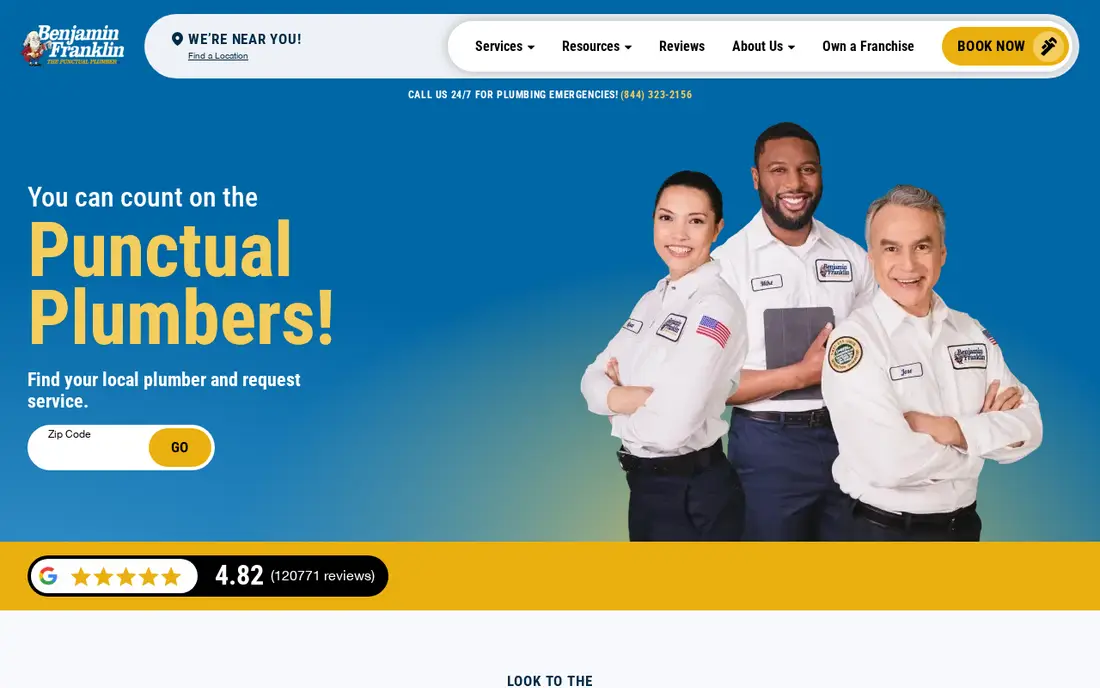
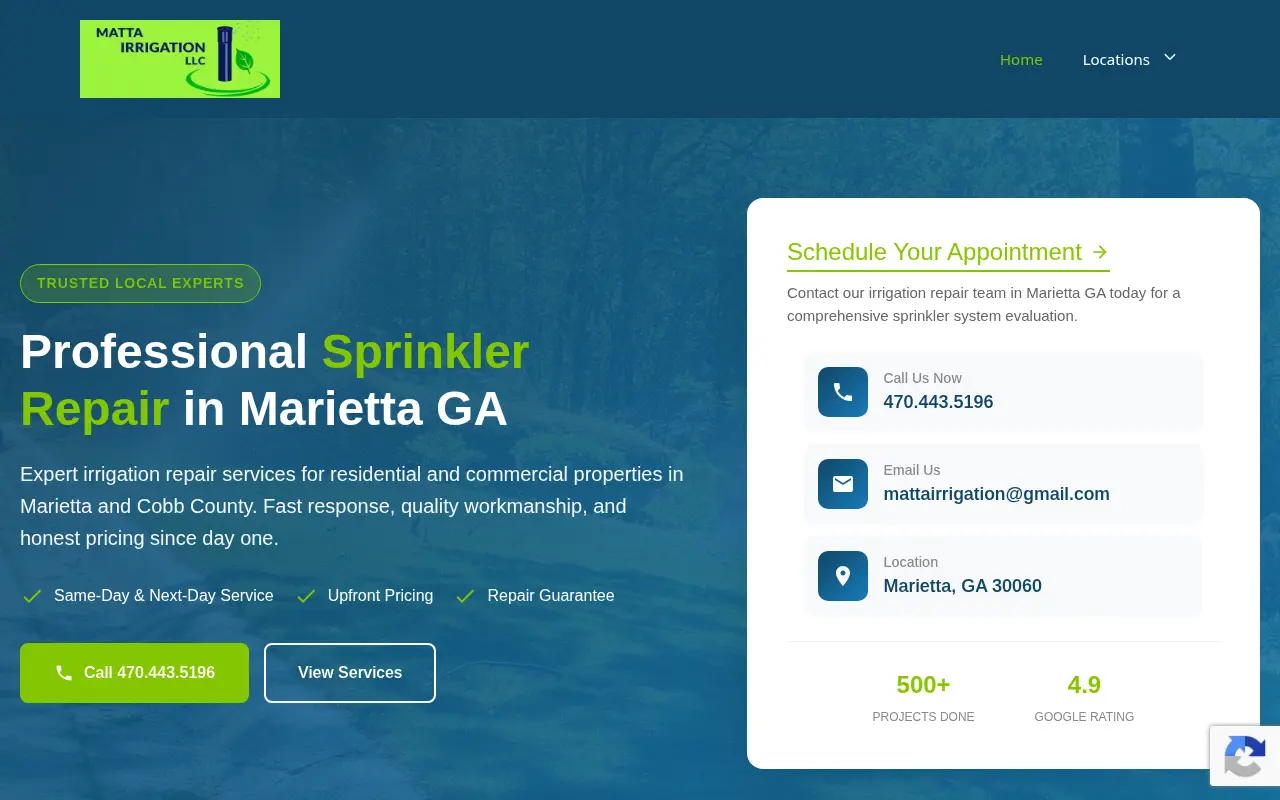
You can learn a lot by looking at the plumbers who rank first in a few big cities. The details vary, but the strong ones share a pattern:
- The phone number is visible without scrolling, on every page.
- The first line says what they do and where.
- Services are split into separate pages, each with its own photos and FAQs.
- Reviews appear near the top, with a rating and a count.
- Photos show real techs and trucks.
- Service area is in plain text, often with a list of towns linking to area pages.
- Pages load fast and work well on a phone.
The weak ones share a pattern too: a big slider, a generic headline like "Quality you can trust", one long services page and a contact form as the main call to action.
You can see the kind of sites we build in the websites we've built, including a home service company in the Atlanta area. We list what we built, not invented numbers about results.
Website needs by type of plumbing business
Not every plumbing company needs the same site. The core stays the same, but the pages and the tone change with the kind of work you want more of.
Residential service and repair
This is the classic plumber website: emergency calls, drains, water heaters, leaks and fixtures for homeowners. Speed and trust matter most. Lead with the phone number, reviews and service area, and build out service and town pages. Most of the traffic comes from phones, often in a hurry.
Drain and sewer specialists
If most of your revenue comes from drain cleaning, hydro jetting, camera inspections and sewer line replacement, make those the center of the site. Explain the difference between snaking and jetting, what a camera inspection shows and when trenchless repair is an option. These jobs are bigger, so customers read more before they call, and a clear explanation can win the job.
Water heater and tankless installers
Water heater customers compare options: tank or tankless, gas or electric, which brand. A page that explains the choices for homes in your area, with rough installed prices and financing, helps them decide and makes them more likely to call you rather than a big box store.
Commercial plumbing
Property managers, restaurants and offices care about response times, service agreements, insurance and references. They read on desktop more often. Add pages for the building types you serve, mention after-hours availability for businesses, and make it easy to request a site visit or a maintenance contract.
New construction and remodels
Builders and homeowners planning a remodel want to see past projects and know you can work with their schedule. Photo galleries of finished bathrooms and kitchens, the builders you work with and a simple quote request form matter more here than a big emergency button.
What to measure after launch
A new site is a starting point. Within the first few months, check a few numbers so you know what is working:
- Calls from the website and from your Google profile. The profile shows calls directly. On the site, count taps on the call button.
- Form submissions and bookings, and which page they came from.
- Search queries in Google Search Console. It shows what people typed before they found you and which pages they landed on. New service or area pages usually take a few weeks to a few months to start showing up.
- Which pages get visits and which don't. A service page with no visits after a few months may need better copy, more local detail or a few links from your other pages.
- Reviews per month. More recent reviews help both the map results and the people deciding whether to call.
Ask your customers how they found you, too. It's the simplest tracking there is.
What we need from you
To build your plumber website, we need a short list of things. Most owners send them in one email:
- Your logo, or a note that you need a simple one
- Photos of your team, trucks and recent jobs, straight from your phone is fine
- The services you want more of and the ones you don't want to advertise
- The towns and neighborhoods you serve
- Your hours and whether you take emergency calls
- Your license number and anything you want said about insurance or guarantees
- Access to your Google Business Profile, or we can help you create one
- Your current website address, if you have one
We write everything else and send you a draft to review.
Templates, website builders or a custom build
You have three realistic options.
Do it yourself with a template. Builders like Wix, Squarespace and GoDaddy have plumber website templates. They cost little upfront, usually a monthly plan. The catch is your time and the SEO work: templates come with one services page and placeholder text, and you still have to plan and write every page yourself.
A marketing agency. Agencies that specialize in plumbing often do good work, but many charge several thousand dollars upfront or a monthly fee with a long contract, and the site may be tied to their platform.
A small team like ours. We build plumber websites from $299 to $630, one-time, based on how many pages your area actually needs. You own the site. We plan the pages from real search data, write them and set up the local SEO basics.
How much does a plumber website cost?
Here is how the main options usually compare. Prices vary a lot by region and provider, so treat these as rough ranges. For the full breakdown, see how much it costs to build a website.
| Option | Upfront | Ongoing | Good fit for |
|---|---|---|---|
| DIY template | Free to a few hundred dollars | Monthly builder plan | Owners with time who like doing it themselves |
| Freelancer | About $1,000 to $5,000 | Hosting plus paid changes | Custom design on a budget |
| Specialist agency | Often $3,000 to $15,000 or more | Often a monthly retainer | Companies spending heavily on marketing |
| SiteCostly | $299 to $630 | Hosting and optional upkeep | Local plumbers who want the right pages at a fixed price |
Our price works like this: $299 covers the home, about and contact pages. Each extra service or area page adds $15, and the total never goes above $630. If your market needs more pages than that, the calculator tells you and we talk about it on a call.
Plus a monthly builder plan and your time to write every page.
Custom design, hosting and changes billed separately.
Service and area pages from your local searches, written for you.
See my exact priceOften with a monthly retainer and a long contract.
What we build for plumbers
When you order a plumber website from us, here is what happens:
- You run the calculator with your city and the services you want more of. You see the searches and the suggested pages before giving us an email.
- One of us reviews your plan, your current site if you have one and the plumbers ranking near you.
- We write the pages in plain language, using your photos, reviews and license details.
- We design the site for phones first, with tap-to-call on every page.
- We set up titles, descriptions, a sitemap, local business schema and your Google Business Profile link.
- You review a draft, ask for changes and we launch.
How to lay out a plumber home page
The home page is where people land when they search your company name or tap through from your Google profile. It doesn't need to say everything. It needs to send each visitor to the right next step. A layout that works for most plumbers, from top to bottom:
- Header with logo, phone button, hours and a short menu: Services, Areas, Reviews, About, Contact.
- Hero with one sentence on what you do and where, like "Licensed plumbers in Marietta and Cobb County, same-day service". Below it, the call button and a second button to book online. Next to it, your star rating and number of Google reviews.
- Main services as cards or a short grid, each linking to its own page. Six to eight is plenty; the rest can live in the menu.
- Why people choose you, in two or three specific points. "Upfront prices before we start" or "Owner on every job" says more than "quality service".
- Reviews, three to six of them, with names and the service they mention.
- Service area, as a list of towns linking to their pages, with a simple map if it helps.
- About in short, with a photo of the owner or team and a link to the full about page.
- A few FAQs people ask before calling: do you charge to come out, do you work weekends, are you licensed.
- Closing call to action, with the phone number and the booking button again.
Keep the copy short. People skim on phones, so short paragraphs and clear headings get read. Long blocks of text get skipped.
The about page: show the people who show up
Visitors open the about page to check one thing: who is going to be in my house? Answer that. Show the owner's name and photo, how the company started, how many techs you have and what training or licenses they hold. A team photo in front of your trucks does more than any paragraph about values.
If you are a one-person shop, say so with confidence. Many homeowners like knowing the owner does the work. Mention the areas you live and work in, and any local ties like sponsoring a school team or years spent in the trade.
Writing copy that sounds like a plumber, not a brochure
The text on most plumber websites sounds the same: "We are committed to providing quality plumbing solutions with honesty and integrity." Nobody believes it, because everyone says it.
Write like you talk to customers. Specific beats general every time:
- Instead of "fast service", say "most calls in Smyrna get a tech the same day".
- Instead of "experienced technicians", say "our techs have at least five years in the field and hold Georgia plumbing licenses".
- Instead of "affordable prices", say "we quote the price before we start and don't charge extra for weekends".
Answer the questions customers ask you on the phone. If people always ask whether you work on tankless heaters or whether you can come on Saturday, put the answer on the site.
Content that helps plumbers rank over time
Once the core pages are live, a little helpful content goes a long way. Short articles answer questions people search before they call, and they give Google more reasons to trust your site. Good topics for plumbers are things like:
- How to shut off your main water valve, with photos of common valve types in your area
- Signs your water heater is about to fail
- Tank vs tankless water heaters for homes in your climate
- What to do about frozen pipes, if you work somewhere it freezes
- Why your drain keeps clogging and when to call a plumber
- What a sewer camera inspection shows and when you need one
Each article should link to the matching service page, so a reader who decides they need help can call. You don't need dozens of posts. A handful of useful ones, written from real jobs, beats a weekly stream of generic filler.
Common mistakes on plumber websites
These come up again and again when we look at plumbing sites:
- No phone number at the top on mobile. The single most expensive mistake.
- One page for all services. It caps how many searches you can show up for.
- Copy-paste area pages. Twenty near-identical pages with the town name swapped, which Google tends to ignore.
- Stock photos. They make you look like everyone else, or worse, like a lead-selling site.
- Slow pages. Big sliders, videos and chat pop-ups that load before the phone number.
- Mismatched contact details. A different phone number or address on the site, the Google profile and directories.
- Claiming 24/7 when you aren't. It costs reviews and trust.
- A site you don't own. Some platforms keep the site if you stop paying. Make sure the domain is in your name.
Plumber website checklist before launch
Use this list whether we build your site or someone else does:
- Phone number visible and tappable at the top of every page on mobile
- Business name, address and phone the same as your Google Business Profile
- One page for each main service and for each town you really serve
- Unique title and description on every page
- Reviews with names near the top of the home page
- License number and insurance mentioned
- Real photos, compressed so pages load quickly
- Contact form with only the fields you need
- Hours that match your Google profile
- A sitemap submitted to Google Search Console
- Local business schema with your service area
- The domain registered in your name
Redesigning an existing plumber website
If you already have a site, don't throw it away blindly. Older pages may already rank for some searches, and losing them during a redesign can cost calls for months.
Before a redesign, list every page on the current site and check which ones get traffic in Google Search Console. Keep the URLs of pages that rank, or set up redirects from the old address to the new one. Reuse good photos and reviews. Then add the service and area pages that are missing.
When you run our calculator, mention your current site when you book a call. We will look at what already works before suggesting changes.