Redesign cost depends on scope
"Redesign" covers very different jobs. Changing colors and photos is a small task. Moving platforms, rewriting content and restructuring pages is a new website. Price follows scope, so define the scope first.
| What people type into Google | US searches per month |
|---|---|
| website redesign services | 5,400 |
| website redesign cost | 260 |
| website redesign pricing | 110 |
| how much does a website redesign cost | 90 |
| cost to redesign a website | 20 |
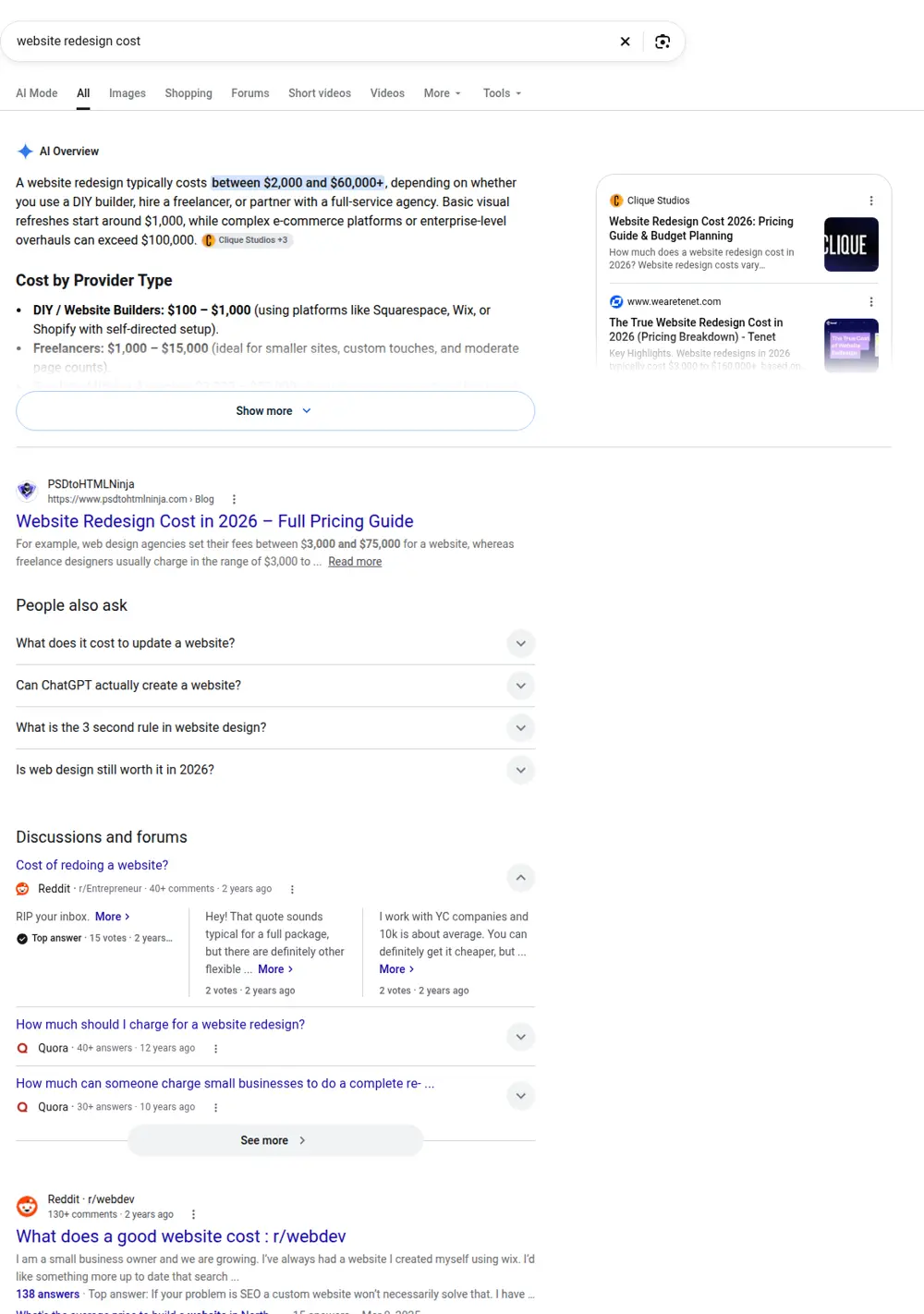
What ranks on Google for "website redesign cost"
When we pulled the Google results for "website redesign cost" in October 2026 through DataForSEO, the first organic spots looked like this:
| # | Site | Page title | Type |
|---|---|---|---|
| 1 | classiccity.com | What Does a Website Redesign Cost? (and a calculator) | Guide or article |
| 2 | designstudiouiux.com | Website Redesign Cost in 2026: $3K–$75K Full Breakdown | Guide or article |
| 3 | forbes.com | How Much Does a Website Cost? (2026 Guide) | Guide or article |
| 4 | reddit.com | How much should a small business realistically budget for ... | Directory, forum or social |
| 5 | linkedin.com | Website Design Costs: A Breakdown by Type | Directory, forum or social |
| 6 | refact.co | Website Redesign Cost: 2026 Budget Guide - Refact | Guide or article |
Redesign cost results include a calculator, a $3K to $75K breakdown and Forbes' general website cost guide, plus Reddit and LinkedIn posts. The wide ranges come from mixing small refreshes with large rebuilds, which is why this page separates them by scope.
Price ranges by level of redesign
| Level | What changes | Typical cost with a freelancer | Typical cost with an agency |
|---|---|---|---|
| Visual refresh | Theme, colors, fonts, photos | Low end of $1,000 to $5,000 | Low end of $5,000 to $30,000 |
| Structural redesign | Page layout, navigation, new pages | Middle of the range | Middle of the range |
| Full rebuild | Platform, content, pages, features | Top of the range | Top of the range or more |
These follow the same ranges as building a site: freelancers typically charge $1,000 to $5,000 and agencies $5,000 to $30,000. A redesign is rarely much cheaper than a new site when content and structure change.
What drives the price
- Number of pages that need new layouts or content.
- Content. Writing new copy and taking new photos is often the biggest cost.
- Platform change. Moving from one platform to another means rebuilding, not editing.
- Features. Booking, forms, integrations or stores add work.
- SEO protection. Mapping old URLs to new ones and setting redirects takes time but is essential.
Redesign or rebuild?
| Sign | Refresh is enough | Rebuild makes sense |
|---|---|---|
| Site looks dated but works | Yes | |
| Slow on phones | Often | |
| Pages don't match what people search | Yes | |
| Platform is hard to edit or expensive | Yes | |
| Brand changed | Yes | |
| You get traffic but few calls | Sometimes | Sometimes |
If the site's pages don't match what customers search for, a prettier version of the same pages won't bring more calls. That's a structure problem, and it usually means a rebuild.
How not to lose rankings in a redesign
- Export a list of every current URL and which ones get traffic in Search Console
- Keep URLs that rank, or redirect each one to its closest new page with a 301
- Keep the content that ranks, improve it rather than delete it
- Check titles and headings on the new pages
- Submit the new sitemap and watch Search Console for errors in the first weeks
That's real Search Console data from one of our client sites, name blurred. Traffic built over time is worth protecting when you change a site.
Mistakes that make redesigns expensive
- Starting design before deciding which pages the site needs.
- Leaving content until the end, which delays launch.
- Dropping URLs without redirects.
- Adding features nobody asked for.
- Redesigning every few years without fixing the real problem.
What a redesign costs with us
We rebuild sites for local service businesses from Google search data for your trade and city. Every page targets real searches. Price: $299 for home, about and contact pages, plus $15 for each extra page the data supports, capped at $630. The website cost calculator shows the pages and price before you pay.
Related cost guides
What people search about redesigns
| Search | Searches a month | What it signals |
|---|---|---|
| website redesign services | 5,400 | Wants someone to do it |
| small business website redesign | 1,900 | Small business owners |
| ai website redesign | 1,600 | Curious about AI tools |
| wix website redesign | 1,000 | Redesign on Wix |
| wordpress website redesign services | 720 | Redesign on WordPress |
| custom website redesign | 720 | Wants custom work |
| seo website redesign | 480 | Worried about rankings |
| rfp for website redesign | 320 | Larger organizations writing proposals |
| average website redesign cost | 260 | Price |
| cheap website redesign | 320 | Price first |
SEO worries come up repeatedly: "seo website redesign", "website redesign seo" and "seo for website redesign" each have hundreds of searches a month. People know redesigns can hurt rankings. That's covered below.
Redesign cost by situation
| Situation | What the work is | Where it lands |
|---|---|---|
| Same platform, new look | New theme or template, same pages | Low end |
| Same platform, new structure | New pages, navigation, some new content | Middle |
| New platform, same content | Migration, rebuilt layouts, redirects | Middle to high |
| New platform, new structure and content | Effectively a new website | Same as building new |
| Brand change | New logo, colors, photos across every page | Depends on page count |
Platform-specific notes
Wix. Wix sites can't be exported to another platform, so moving away from Wix means rebuilding the site, though your text and images can be reused. Staying on Wix and changing the template or layout is often cheaper.
WordPress. You can change themes and keep content, but page builders and theme-specific features don't always carry over cleanly. Budget time for fixing layouts after a theme change.
Squarespace. Changing templates or versions can affect layouts. Moving off Squarespace means rebuilding on the new platform.
For platform costs see Wix website cost and WordPress website cost.
Can AI redesign a website?
AI tools can now generate layouts, images and draft text quickly, and "ai website redesign" has 1,600 searches a month. They're useful for drafts and ideas. They don't know which pages your customers search for, what your real prices and services are, or which of your old URLs have Google traffic to protect. Use them as a starting point, and check every fact and page before launch.
A step-by-step redesign plan
- Measure the current site. Note top pages, calls, forms and traffic in Search Console and analytics.
- List what's wrong. Speed, missing pages, outdated info, hard to edit, poor conversion.
- Decide the page list. Based on real searches for your services and areas.
- Map old URLs to new ones. Every page with traffic gets a destination.
- Collect content. Photos, service details, prices, reviews.
- Build and review. Check on a phone first.
- Launch with redirects. 301 redirects from old URLs.
- Watch for a month. Search Console errors, rankings, calls.
How to compare redesign quotes
| Question | Why it matters |
|---|---|
| Which pages will be redesigned or added? | Defines scope |
| Who writes or updates the content? | Often the biggest cost |
| Will URLs change, and who sets the redirects? | Protects rankings |
| Is the platform changing? | Rebuild versus refresh |
| How many revision rounds? | Controls cost overruns |
| What happens to the old site? | Backup in case you need it |
| What's the timeline? | Plan around busy seasons |
When not to redesign
If the site is fast, works on phones, and has the right pages but isn't getting calls, the problem may be elsewhere: your Google Business Profile, reviews, or prices. A redesign won't fix those. Sometimes adding a few missing service pages costs far less than a redesign and brings more calls.
Timing a redesign
For seasonal businesses, launch a redesign before the busy season, not during it. A landscaper redesigning in March, or an HVAC company in May, risks launching just as searches climb. Give the new site a few weeks to settle before your peak.
Signs your website needs a redesign
Not every old website needs replacing, but some signs are clear. The site is slow on phones or hard to use on a small screen. You can't update it yourself, or each change costs money. It's missing pages for services you now offer or areas you now serve. The design no longer matches your business, after a rebrand or a change in what you do. Calls and form submissions have dropped while your business hasn't changed. Or your platform has become expensive or limiting.
If only one or two of these apply, a targeted fix may be enough: new service pages, a faster theme, or updated photos. If several apply, a redesign usually pays off.
What you can keep from your old site
A redesign doesn't mean throwing everything away. Pages that rank in Google and bring traffic are worth keeping or improving, with the same URLs where possible. Good photos of real jobs and your team can be reused. Customer reviews can move to the new site. Text that explains your services well can be edited rather than rewritten. Check Search Console before the redesign to see which pages and searches bring visitors, and protect those.
Redesigning on a budget
If budget is tight, focus on what brings calls. Fix the mobile experience first: a tappable phone number, a clear button, fast loading. Add pages for your most important services and areas. Replace stock photos with real ones. Update outdated information. These changes often matter more than a new look, and they cost less.
Working with a designer on a redesign
Give the designer access to your current site, your analytics or Search Console, and a list of what's working and what isn't. Share examples of sites you like and why. Agree on the page list and URL plan before design starts. Ask for a staging version to review before launch, and check it on your phone. After launch, ask the designer to confirm redirects are working and to fix any errors that show in Search Console in the first weeks.
Measuring a redesign's success
Decide before you start how you'll judge the result. Useful measures for a local business include calls and form submissions from the site, traffic from Google in Search Console, and rankings for your main service searches. Compare the same months before and after, since many businesses are seasonal. Expect some movement in rankings in the first weeks after a launch while Google processes the changes; with redirects in place, they usually settle.
Redesign versus adding pages
Sometimes the cheapest way to get more calls isn't a redesign at all. If your site looks fine and works on phones but only has a single services page, adding a page for each main service and area can bring more search traffic than a full redesign. We price that kind of work the same way as a new site: by the pages real searches support. The website cost calculator shows which pages your market supports.
Questions to settle before a redesign starts
- Which pages stay, which change and which are new
- Which URLs change, and where each old URL redirects
- Who writes new content and who approves it
- Who provides photos
- Which platform the new site will use, and who will maintain it
- The launch date, avoiding your busiest season
- What happens to the old site after launch
Redesign costs on common platforms
Redesigning a Wix site. Staying on Wix and switching templates or rebuilding layouts is usually the cheapest kind of redesign, because hosting, domain and content stay where they are. "Wix website redesign" has 1,000 searches a month, so many owners look for help with exactly this. The work is mostly layout and content, and the platform cost stays the same: Light $17, Core $29 or Business $39 a month billed yearly.
Redesigning a WordPress site. Options range from a new theme on the same install to a full rebuild with a new theme, new page structure and cleaned-up plugins. "WordPress website redesign services" has 720 searches a month. A redesign is a good moment to remove unused plugins and switch to lighter hosting or a faster theme, which also lowers maintenance.
Moving from a builder to WordPress or a custom site. This is a rebuild. Content moves over; layouts don't. Budget for redirects from every old URL that has traffic.
Who should do your redesign
| Option | Good when | Watch for |
|---|---|---|
| You | Small builder site, a refresh, and you have time | Missing redirects, skipped mobile testing |
| The original designer | They know the site and you were happy with them | Repeating old mistakes |
| A new freelancer | Clear scope, modest budget | Access to everything before they start |
| An agency | Large site, rebrand, complex features | Paying for process you don't need |
How long a redesign takes
A light refresh can take a few days to a couple of weeks. A structural redesign or rebuild for a small business usually takes several weeks, and longer if content needs writing from scratch. Larger sites and agency projects can take months. The biggest delays are content and approvals, so collecting photos and details early and agreeing on who signs off saves the most time.
A redesign brief template
Writing a short brief before contacting designers gets you better quotes. Include:
- What your business does and where
- Your current site address and platform
- What's working and what isn't
- The pages you want, including new services or areas
- Sites you like and why
- Features you need, such as booking or forms
- Who will maintain the site after launch
- Your budget range and preferred launch date
A brief like this lets designers quote the same scope, which makes quotes comparable.
After launch: the first 30 days
The first month after a redesign matters. Check Search Console for crawl errors and pages that dropped out of the index. Test every form and phone link. Look at the site on several phones. Watch calls and form submissions against the same period last year. If a page that used to bring traffic has lost it, check that its redirect works and that the new page covers the same topic. Small fixes in this window prevent lasting losses.
Redesign mistakes that cost the most
The costliest redesign mistakes are rarely about design. Launching without redirects can drop search traffic for months. Removing pages that brought calls because they "didn't fit" the new design loses leads. Changing the business name, phone or address on the site without updating the Google Business Profile confuses customers and Google. Launching during the busy season leaves no room to fix problems. And skipping mobile testing means most visitors see a broken version. Each of these is avoidable with a checklist and a little patience.
What a redesign won't fix
A new website can't fix low review counts, an incomplete Google Business Profile, prices out of line with the market, or slow responses to calls and messages. If those are the problems, spending on a redesign first means spending money in the wrong place. Fix the basics, then redesign if the site is still holding you back.
Getting a fair redesign quote
Share your current site, your brief and your page list with two or three providers. Ask each for a written scope listing every page, whether content is included, the platform, the redirect plan, revision rounds and the timeline. Compare them side by side, and ask about anything that differs. A provider who explains the differences clearly is usually one who'll communicate well during the project.
Keeping costs down on a redesign
The cheapest redesigns start with clear decisions. Settle the page list, the platform and the content plan before design work begins, and avoid changing them midway, because rework is where budgets grow. Reuse good photos and text. Limit revision rounds to what's in the scope. And keep features to what customers actually use: a fast page with a clear phone number usually brings more calls than any animation or widget.
Redesign or new business website?
If your business has changed a lot since the site was built, with new services, new areas or a new name, treat the project as a new website rather than a redesign. Start from what customers search for today, not from the old menu. Keep old URLs that still get traffic and redirect the rest. This approach often costs about the same as a big redesign, and the result fits the business you have now instead of the one you had when the old site went up. It also gives you a clean structure that's easier to add to as you keep growing.