What website maintenance actually means
Maintenance is everything that keeps a site online, safe and accurate after launch. Some of it is a bill you can't avoid, like the domain renewal. Some of it is work, like updating plugins or changing your hours. The cost depends mostly on the platform and on how much of that work you want to hand off.
| What people type into Google | US searches per month |
|---|---|
| website maintenance services | 1,600 |
| website maintenance cost | 320 |
| website maintenance plans | 260 |
| website maintenance packages | 170 |
| how much does website maintenance cost | 50 |
| website maintenance pricing | 30 |
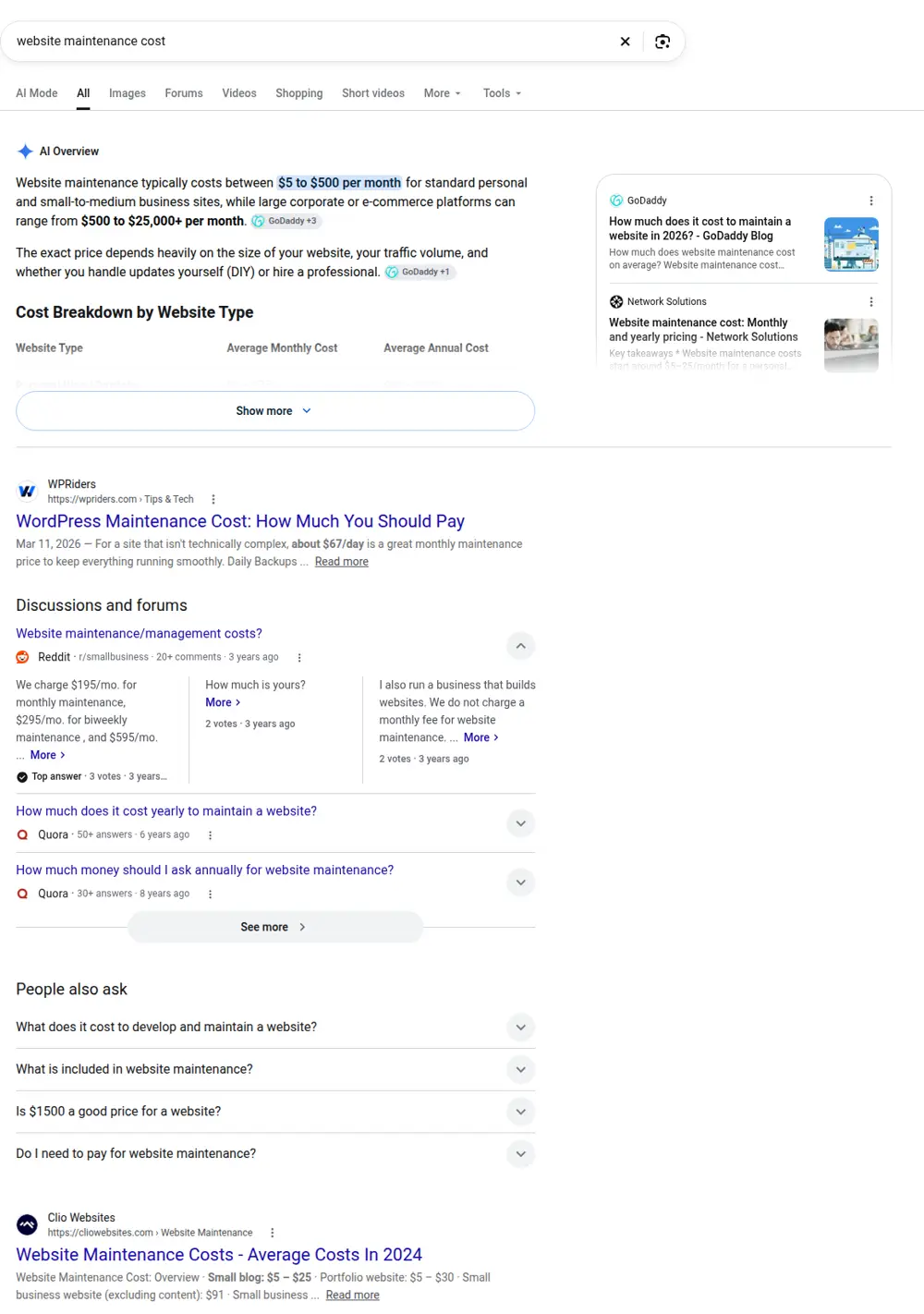
What ranks on Google for "website maintenance cost"
These are the top organic results for "website maintenance cost" when we checked in October 2026 with DataForSEO:
| # | Site | Page title | Type |
|---|---|---|---|
| 1 | aalpha.net | How Much Does Website Maintenance Costs in 2026 : Aalpha | Guide or article |
| 2 | concettolabs.com | Website Maintenance Cost in 2025 - 7 Easy Steps! | Guide or article |
| 3 | galaxyweblinks.com | How Much Should You Invest In Monthly Website ... | Guide or article |
| 4 | forbes.com | How Much Does a Website Cost? (2026 Guide) | Guide or article |
| 5 | hostinger.com | Website maintenance cost: A full pricing breakdown | Guide or article |
| 6 | burguerastudio.com | How much does website maintenance cost (no fluff) | Guide or article |
Every top result for website maintenance cost is a guide, several from agencies abroad that sell maintenance. Prices in those guides vary widely. The routine and checklists on this page let you judge what your own site actually needs before buying a plan.
Yearly fixed costs
| Item | Typical cost | Who needs it |
|---|---|---|
| Domain renewal | $10 to $20 a year | Every site |
| Hosting | $36 to $500 a year | Self-hosted sites; builders bundle it in the plan |
| SSL certificate | Usually free | Included by most hosts and builders |
| Business email | About $6 per person a month | Anyone who wants name@yourbusiness.com |
| Builder plan | About $17 to $39 a month billed yearly | Wix or Squarespace style sites |
| Premium plugins or apps | $0 to a few hundred a year | Mostly WordPress and stores |
Monthly maintenance plans: what's inside
Paid plans range from $0 (you do it) to about $150 a month for a small business site. Larger and ecommerce sites can cost more. A plan usually covers some of these:
- Software, theme and plugin updates
- Daily or weekly backups, with restore tests
- Uptime and security monitoring
- Malware cleanup if something goes wrong
- Small content edits each month
- Speed checks and fixes
- A monthly report
Before you sign, ask how many minutes of edits are included and what happens to unused time.
Maintenance cost by type of site
| Site type | DIY yearly cost | With a paid plan | Main work |
|---|---|---|---|
| Builder site (Wix, Squarespace) | Plan plus domain | Rarely needed | Content edits |
| Small WordPress site | Hosting, domain, plugins | $50 to $150 a month | Updates, backups, security |
| Lean static or custom site | Hosting and domain | Little needed | Occasional edits |
| Online store | Plan, apps, fees | Often more | Products, apps, checkout |
The platform matters more than any plan. A site with dozens of plugins needs regular care. A lean site with few moving parts needs very little. See the WordPress website cost and the Wix website cost for platform details.
DIY maintenance or paid?
- DIY pros: no monthly fee, you learn your site, edits happen when you want.
- DIY cons: updates get skipped, backups don't get tested, problems get noticed late.
- Paid pros: someone is responsible, faster fixes, security monitoring.
- Paid cons: a monthly bill, and some plans charge for work that rarely happens.
A good rule: if your site runs on WordPress and earns you calls, pay someone or set a monthly reminder and actually do it. If it's a builder or lean site, DIY is usually fine.
Signs you're overpaying
- Paying a high monthly fee for a site that never changes.
- "SEO" bundled into maintenance with no report of what was done.
- No access to your own site, or a domain registered in the vendor's name.
- Paying for hosting twice, once to the builder and once to a host.
- Long contracts with cancellation fees.
The hidden cost of no maintenance
Skipped updates don't cost money today. They cost later: a hacked site, a broken form nobody noticed for weeks, or a page that slowly drops in Google because it loads slowly on phones. A broken contact form on a service business site means missed calls you never hear about.
That chart is real Search Console data from one of our client sites, with the name hidden. Steady traffic like this depends on a site that stays fast and online.
How our sites keep upkeep low
We build lean sites for local service businesses, with few moving parts to update. You own the site and domain. Pricing is $299 for home, about and contact pages, plus $15 for each extra page that search data supports, up to $630. Try the website cost calculator to see your price, or read about website redesign cost if your current site is past saving.
A simple yearly maintenance routine
- Monthly: test the contact form and phone links, check that the site loads fast on your phone.
- Quarterly: update hours, services, photos and prices. Review plugin or app subscriptions.
- Yearly: renew the domain, check who has access, confirm backups restore.
What people search about maintenance
| Search | Searches a month | What they want |
|---|---|---|
| website maintenance services | 1,600 | Someone to do it |
| wordpress website maintenance service | 880 | WordPress care specifically |
| website maintenance charges | 480 | Price |
| website maintenance cost | 480 | Price |
| website maintenance plans | 260 | Plan options |
| website maintenance packages | 170 | Plan options |
| website maintenance cost per month | 30 | Monthly price |
WordPress-specific searches are large: "wordpress website maintenance service" alone has 880 a month. That matches what we see. WordPress sites need the most ongoing care, because of core, theme and plugin updates.
Maintenance tasks and how often
| Task | How often | DIY time | Why it matters |
|---|---|---|---|
| Test contact forms and phone links | Monthly | Minutes | Broken forms mean lost leads you never see |
| Software and plugin updates (self-hosted) | Weekly to monthly | 15 to 60 minutes | Security and compatibility |
| Backups | Daily to weekly, automatic | Setup once, test quarterly | Recovery after problems |
| Uptime monitoring | Continuous, automatic | Setup once | Know when the site is down |
| Speed check on a phone | Quarterly | Minutes | Slow pages lose visitors |
| Update hours, prices, services, photos | When they change | Varies | Wrong info costs trust |
| Renew domain | Yearly | Minutes | An expired domain takes the site down |
| Review who has access | Yearly | Minutes | Remove old logins |
| Check Search Console for errors | Monthly | Minutes | Catch indexing problems early |
Three example maintenance budgets
| Site | DIY yearly | Paid yearly |
|---|---|---|
| Builder site, 8 pages | Builder plan plus domain renewal after year one, email | Rarely needs a plan; occasional paid edits |
| Small WordPress site, 10 pages, 15 plugins | Hosting, domain, plugin licenses, your time | Plus $600 to $1,800 a year for a plan at $50 to $150 a month |
| Lean static site, 10 pages | Hosting, domain, email | Occasional paid edits |
These follow our guide ranges: domain $10 to $20 a year, hosting $36 to $500 a year, maintenance $0 to $150 a month, email about $6 per user a month.
How maintenance plans are priced
| Model | How it works | Watch for |
|---|---|---|
| Flat monthly plan | Fixed fee covers a set list of tasks | What's excluded, edit limits |
| Hourly or block of hours | Pay for time used or buy hours in advance | Minimum billing increments, expiring hours |
| Per task | Each update or edit priced separately | Small edits adding up |
| Bundled with hosting | Host includes updates and backups | Whether content edits are included |
What a fair maintenance plan should list
- Exactly which updates are done, and how often
- Backup frequency, where backups are stored and how long they're kept
- Response time for urgent problems
- Whether hack cleanup is included or extra
- Minutes or hours of content edits per month
- Whether unused time rolls over
- Reporting: what you'll receive each month
- How to cancel, and that you keep full access
Maintenance after a hack
If a site gets hacked, cleanup can take hours of work and sometimes means restoring from a backup and rebuilding parts of the site. Many plans include cleanup; others charge separately. Without a plan, you pay at whatever rate the person you find charges, usually under pressure. Good backups and regular updates are far cheaper than recovery.
Maintenance versus marketing
Some plans mix maintenance with "SEO" or "marketing". They're different jobs. Maintenance keeps the site working. Marketing brings people to it: new pages for services people search, reviews, local listings, ads. If a plan includes marketing, ask for a specific list of what will be done each month and how you'll see results.
Keeping maintenance cheap from the start
The cheapest maintenance is a site that needs little. Fewer plugins, a simple theme or a lean build, and hosting with automatic backups cut upkeep more than any plan. When we build a site, we keep it lean so most months there's nothing to do except check that the form works.
Who should do your maintenance
| Option | Best when |
|---|---|
| You | Builder or lean site, and you're comfortable checking things monthly |
| Your web designer | They built it and know it, and their plan is clear |
| A maintenance company | Self-hosted WordPress with many plugins, and you want guaranteed response times |
| Your host's managed plan | You want updates and backups handled, and edits are rare |
Maintenance for builder sites
On Wix, Squarespace and similar builders, the platform handles software updates, hosting and security. That removes most technical maintenance. What's left is content: keeping services, prices, hours and photos current, and checking that forms and booking links work. For most small businesses on a builder, that's an hour or two a month at most, and paying for a maintenance plan rarely makes sense unless you'd rather not touch the site at all.
The main recurring cost is the plan itself. On Wix, Light is $17 a month and Core $29 a month billed yearly. Those fees include hosting, so there's nothing else to pay for hosting. See our Wix website cost page for the full picture.
Maintenance for WordPress sites
Self-hosted WordPress is where maintenance matters most. WordPress core, your theme and each plugin get regular updates, some fixing security issues. Skipping them leaves known weaknesses open. Applying them without a backup risks breaking the site.
A safe routine looks like this: automatic daily backups stored off the server, updates applied weekly or every two weeks, a quick check of key pages and forms after updating, and a test restore every few months. Done yourself, that's perhaps an hour or two a month for a small site. Paid plans for small WordPress sites commonly run $50 to $150 a month and take it off your plate. See WordPress website cost for hosting and plugin costs.
Maintenance for lean custom sites
Sites built without a content management system, or with very few moving parts, need the least maintenance. There are no plugins to update and little that can break. Upkeep is mostly content changes and renewing the domain and hosting. The trade-off is that edits may need the person who built it, so ask how changes are handled and what they cost.
What to do when something breaks
If your site goes down or looks wrong, check the obvious first: has the domain expired, has the hosting bill failed, did an update just run? Your host's support can confirm whether the server is working. If you have a maintenance plan, contact them right away. If you don't, a backup is your best friend: restoring yesterday's copy often fixes problems caused by a bad update. Without a backup, recovery can take much longer and cost more.
Content maintenance: the part people forget
Technical upkeep keeps a site running. Content upkeep keeps it useful. Outdated prices, old staff photos, services you no longer offer, or hours that changed months ago all cost trust. Set a reminder every three months to read through your main pages as if you were a new customer. Update anything that's wrong. Add new photos of recent jobs. If you've added a service, give it a page.
Security basics for any website
- Use strong, unique passwords and turn on two-factor login where available
- Remove logins for people who no longer work with you
- Keep software and plugins updated, or use a platform that does it for you
- Use HTTPS, which most hosts and builders include free
- Keep backups off the server, so a server problem doesn't take them too
- Register your domain with auto-renew and a current payment method
Domain and hosting renewals
Two renewals can take a site offline if missed: the domain and the hosting. Turn on auto-renew for both, and keep the payment card on file current. Note the renewal dates in your calendar too. Many low first-year prices for hosting and domains renew higher, so check renewal rates when you first sign up and budget for them.
Maintenance contracts: what to read carefully
Before signing a maintenance contract, read the terms on a few points. The length of the contract and whether it renews automatically. The notice period to cancel. Who owns the site, domain and content, and how you get full access if you leave. What counts as an "edit" and how many are included. What's excluded, often redesigns, new pages and hack cleanup. And the response time for urgent problems, ideally in writing. A short, clear contract is a good sign.
Uptime monitoring
Uptime monitoring checks your site every few minutes and alerts you if it stops responding. Free and low-cost monitoring services exist, and many maintenance plans include it. Without monitoring, owners often learn their site was down from a customer, days later. With it, you can act within minutes.
Speed as part of maintenance
Sites tend to get slower over time as images, plugins and scripts pile up. A speed check every few months keeps that in check. Tools like Google's PageSpeed Insights show what slows a page down. Common fixes include compressing large images, removing unused plugins or scripts, and caching. Fast pages keep visitors from leaving and support rankings, especially on phones.
Annual review checklist
- Renew or confirm auto-renew for domain and hosting
- Review who has admin access and remove old accounts
- Confirm backups exist and test a restore
- Review plugin and app subscriptions and cancel unused ones
- Check every page for outdated information
- Run a speed test on your main pages
- Check Search Console for errors and coverage issues
- Review your maintenance plan: is it worth what you pay?
Budgeting for maintenance
A simple way to budget: add up your fixed yearly costs (domain, hosting or builder plan, email, paid plugins), then decide whether you'll do the work yourself or pay for it. If paying, add 12 months of the plan fee. Add a small reserve for unexpected fixes. For most small service businesses, the total lands within our guide ranges: domain $10 to $20, hosting $36 to $500, maintenance $0 to $150 a month.
Maintenance and Google
Maintenance affects how Google sees your site. Broken pages, slow loading, security warnings and outdated information can all hurt how your site performs in search. Fixing errors in Search Console, keeping pages fast and keeping business details accurate are all maintenance tasks that support your rankings. They're not a replacement for good pages, but neglecting them can undo the value of good pages over time.
Maintenance costs for ecommerce and larger sites
Online stores and larger sites cost more to maintain because more can go wrong and more is at stake. Product pages need updating, apps and extensions need attention, checkout needs testing, and downtime costs sales directly. Plans for these sites typically cost more than the small-business range above, and owners often budget for developer time each month. If your site is a simple service site, you don't need that level of care.
Questions to ask a maintenance provider
Before hiring someone, ask how they handle a failed update, how quickly they respond to an outage, where backups are stored, how you'll know what was done each month, and what happens to your site if they stop working with you. Clear answers to these tell you more than the monthly price.
Should you pay for maintenance yearly or monthly?
Some providers offer a discount for paying yearly. That can save money if you're confident you'll stay with them. Monthly billing costs more over a year but lets you leave if the service isn't working. For a new provider, starting monthly and switching to yearly once you trust them is a sensible approach. Whichever you choose, keep a record of what's done each month so you can judge whether the plan is worth what you pay.
Maintenance when you change providers
If you switch maintenance providers or web designers, make the handover clean. Collect every login: domain registrar, hosting, the site's admin, email, analytics and Search Console. Change passwords after the old provider is off. Download a full backup before anything changes. And check that renewals are billed to you, not to the old provider. A clean handover prevents the most common emergency we see: a domain or hosting account nobody can reach when it's about to expire.